Note: This is not a standalone module. It requires the Perfex CRM application, which can be purchased here.
Anna – AI Copilot & MCP Integration for Perfex CRM
Version 2.0 — Full Source Code, Completely Self-Hosted
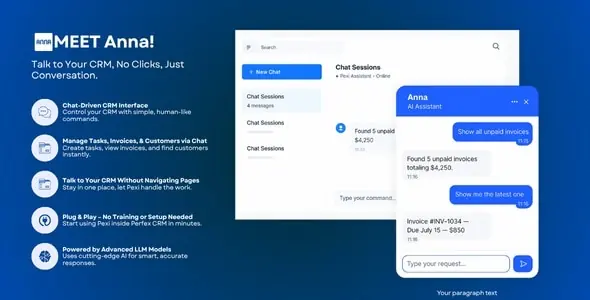
Anna is an intelligent AI assistant built directly into your Perfex CRM. Ask questions, search records, create leads, manage tasks, connect external services, and automate your CRM workflows — all through a natural conversation. No clicking through menus. No training required. Just talk.
Version 2.0 is a complete rebuild. You get the full source code, run everything on your own server, bring your own API key from any supported provider, and connect Anna to virtually any external service through the Model Context Protocol.
Stop navigating your CRM. Start talking to it.
What’s New in Version 2.0
Choose Your AI Provider
Anna works with all major AI providers. You bring your own API key and choose the model that fits your budget and needs. No middleman, no markup — you pay the provider directly at their published rates.
Supported Providers
You can also enter any custom model ID for providers that offer additional models beyond the presets.
MCP Connections — Connect Anna to Any External Service
The Model Context Protocol (MCP) lets Anna talk to external services and take actions on your behalf. Once connected, you simply tell Anna what you want — it figures out which service to use and does it for you.
Ready-to-Connect Integrations
What This Looks Like in Practice
MCP Server — Use Your CRM from Any AI Client
Anna does not just consume external MCP servers — it also acts as one. With the built-in MCP Server, your entire Perfex CRM becomes accessible from any AI client that supports the Model Context Protocol.
Connect Claude Desktop, Cursor, or any other MCP-compatible tool to your Perfex CRM and start managing your business from your favourite AI environment.
What you can do from an external MCP client
Setup takes seconds. Copy the endpoint URL and API key from the Anna settings page and paste them into your MCP client configuration.
Tools Control — Only Enable What You Need
Anna comes with 54 built-in CRM tools covering every core module. Every tool Anna has access to adds to the context sent to the AI model, which means more tools equals higher token consumption and cost per conversation.
The Tools tab lets you enable or disable each tool individually. Disable the ones your team does not need and keep usage lean.
Available Tool Categories
Tools that create or modify data are marked and always require your explicit approval before anything is changed in your CRM.
Human-in-the-Loop — Nothing Changes Without Your Approval
Whenever Anna is about to create, update, or delete a record, it stops and shows you exactly what it is about to do. You review the details and either approve or reject the action. Nothing is written to your database without your confirmation.
This applies to all write operations: creating leads, customers, invoices, tasks, estimates, and contacts, as well as updating or deleting records.
Chat Interfaces
Anna provides two chat interfaces that work side by side.
Floating Chat Widget
Available on every page of your Perfex CRM admin panel. Click the button in the bottom-right corner to open a drawer-style chat panel. Your conversation continues as you navigate between pages.
Full Chat Page with Sidebar
A dedicated full-screen chat experience with a conversation list in the sidebar. Switch between past conversations, start new ones, and read through complete chat histories.
Appearance Customisation
Make Anna feel like it belongs to your brand. Every visual element is configurable from the Appearance tab in settings — no code changes needed.
Real-World Use CasesFor Business Owners and Managers
For Sales Teams
For Project Managers
For Account Managers
Setup in Minutes
For Ollama users running a local model, no API key is needed at all. Point Anna to your Ollama instance and start using it for free.
Frequently Asked Questions
Do I need an OpenAI account specifically?
No. Anna supports six different providers. You can use whichever one you prefer. If you run Ollama locally, you do not need any paid API key at all.
Is any of my CRM data sent to a third-party server managed by you?
No. Anna runs entirely on your server. The only external communication is between your server and the AI provider you have chosen — the same way any AI-connected app works. We do not receive, see, or store any of your data.
Can I use multiple AI providers at the same time?
The settings allow one active provider at a time, but you can switch between providers whenever you want from the settings page.
What happens when Anna wants to create or change a record?
It stops and shows you exactly what it is about to do. You must approve the action before anything is written to your database.
What is MCP and do I need it?
MCP (Model Context Protocol) is an open standard for connecting AI assistants to external tools and services. It is entirely optional. Anna works perfectly without any MCP connections. MCP is for teams that want to extend Anna’s reach into services like Stripe, Xero, Slack, or Notion.
Can I connect Anna to Claude Desktop or Cursor?
Yes. The MCP Server feature generates an endpoint that you can add to any MCP-compatible client. You will have full access to your Perfex CRM tools from within that client.
How do I control costs?
Use the Tools tab to disable any tools you do not need. Fewer tools means a shorter system prompt, which means lower token consumption per conversation. You can also choose a more cost-efficient model from your provider.
Is the full source code included?
Yes. Version 2.0 ships as a standard Perfex CRM module with full PHP source code. You can inspect, modify, and extend it as needed.
Is it mobile friendly?
Yes. Both the floating widget and the full chat page are fully responsive and work on desktop, tablet, and mobile.
Can multiple staff members use Anna simultaneously?
Yes. Each staff member has their own private conversation history. There are no per-user limits imposed by the module itself — limits depend only on your AI provider plan.
ChangelogVersion 2.0.0 — Current Release
Version 1.0.0
Anna – Making CRM Simple Through Conversation.
Published:
Jun 16, 2026 02:23 PM
Version:
v2.0.0
Category: